Tools & Software
Airbnb's new host tools for fall 2026: what to turn on first
Seven host changes from Airbnb arrive in stages, by listing count and country. What each one does, what Airbnb hasn't said, and what to check before you switch it on.

On this page
- What did Airbnb announce, and when do you get each tool?
- How Airbnb's dynamic pricing works, and what to set before you tap
- Is the 15% top-rated guests discount worth it?
- What earnings insights and the new calendar tips will suggest
- Who gets the multi-listing calendar, and what does it automate?
- Should you scan a 3D floor plan?
- Smart Setup builds a listing from your address
- What should you do this week?
- Your next step

Airbnb announced seven changes for hosts on September 30, 2026: dynamic pricing, a 15% discount for top-rated guests, AI earnings insights, new calendar tips, a multi-listing calendar, 3D floor plans and a listing tool called Smart Setup. They don't arrive together. Some started that day, some start in October and some come "in the coming months", and which ones you see depends on how many listings you run and where your home is (Airbnb Resource Center).
Below, each tool gets the same treatment from Airbnb's own pages: what it does, who gets it and when, what Airbnb hasn't said yet, and the one thing to check before you use it. Dynamic pricing and the discount get the most space because they change what lands in your payout.
Key Takeaways
- The tools arrive in stages: earnings insights are rolling out to hosts with 5 or fewer listings, and the multi-listing calendar becomes the default for hosts with 6 or more.
- Airbnb hasn't said whether dynamic pricing replaces Smart Pricing. Run one pricing engine per listing, and set your floor from your own costs.
- The top-rated guests discount takes 15% off the nightly rate for guests rated 4.8+ with 3+ reviews, and it can combine with one of your other discounts.
- In an illustration ($200 a night, a $120 cleaning fee, an assumed $100 turnover cost), the discount costs $76.05 per 3-night stay, so about 15% of discounted stays, roughly 1 in 7, must be bookings you'd otherwise miss just to break even.
- Airbnb's Host Discount Policy requires a true discount, below your typical price for that date, so don't raise rates to fund it. If your floor can't absorb 15%, leave it off.
What did Airbnb announce, and when do you get each tool?
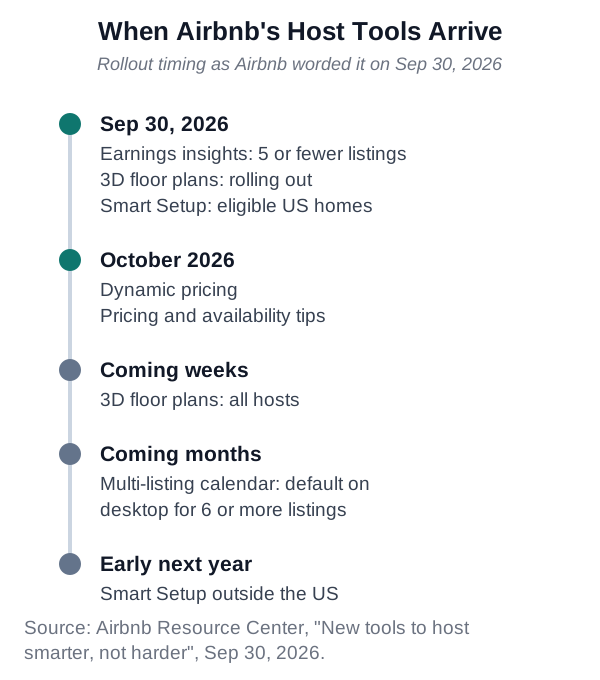
Airbnb's seven new host tools arrive in stages between September 30, 2026, and early next year (Airbnb Resource Center). The table below uses Airbnb's own timing words. The top-rated guests discount is already live: the announcement carries an Add discount button, and Airbnb's help center lists it among the discounts you can set in your calendar (Airbnb Help Center).
- Dynamic pricing. What it does: Recommends a price range; prices adjust daily. Who gets it: Not stated. When: Starts rolling out in October.
- Top-rated guests discount. What it does: 15% off for guests rated 4.8+ with 3+ reviews. Who gets it: Not stated. When: Available now.
- Earnings insights. What it does: AI summary with suggested actions. Who gets it: Hosts with 5 or fewer listings. When: Rolling out since September 30.
- Pricing and availability tips. What it does: Calendar suggestions, such as last-minute settings. Who gets it: Not stated. When: Starts rolling out in October.
- Multi-listing calendar. What it does: Bulk edits across listings. Who gets it: Hosts with 6 or more listings. When: In the coming months.
- 3D floor plans. What it does: Room scan that builds a floor plan. Who gets it: All hosts in the coming weeks. When: Rolling out now.
- Smart Setup. What it does: Builds a listing from your address. Who gets it: Hosts with eligible homes. When: US now; outside the US early next year.
How Airbnb's dynamic pricing works, and what to set before you tap
Airbnb's dynamic pricing recommends a price range and updates your nightly prices daily. Airbnb says you can "check how competitive it is with similar listings and make changes anytime" (Airbnb Resource Center), and its newsroom post says that "with one tap, nightly prices adjust automatically based on daily demand and supply" (Airbnb Newsroom). It starts rolling out in October.
On the August earnings call, Airbnb CEO Brian Chesky said the model takes in "a lot of data sources of hotel prices, of Airbnb prices, events coming to town, the nature of lead time bookings". He also said, "We don't price the listings" (The Motley Fool transcript).
One pricing engine per listing
Airbnb hasn't said whether dynamic pricing replaces Smart Pricing or how it treats a connected pricing tool, and its Smart Pricing help page doesn't mention the new tool (Airbnb Help Center). That page does warn that if you add a discount, "the price guests pay may go below the minimum Smart Pricing you set for those nights." Plan as if a discount can take you below any engine's minimum.
PriceLabs' instructions say "If Smart Pricing is enabled on Airbnb, turn it off" (PriceLabs Help), and Wheelhouse recommends "turning off Smart Pricing to avoid any potential pricing confusion between Airbnb Smart Pricing and Wheelhouse" (Wheelhouse Help). Until Airbnb explains how dynamic pricing treats a connected tool, keep your third-party tool as the only engine on that listing.
Market pricing helps, within limits
A market-based engine pulls your price toward what similar listings charge. For hosts who price flat, that's often an upgrade: a 2021 Marketing Science study of Smart Pricing found that among adopters, "the average nightly rate decreased by 5.7%, but average daily revenue increased by 8.6%" (INFORMS). For events and your last open nights, see when to override a dynamic pricing tool.
Set the bottom of the range first
Before you tap, work out the bottom of your range from your own costs and enter it yourself. Most hosts pay a 15.5% service fee, taken out of the payout (Airbnb Help Center). In an illustration where you need $150 a night after the fee, your minimum is $177.51 ($150 / 0.845). The break-even occupancy calculator helps you build that floor from your costs.
Is the 15% top-rated guests discount worth it?
The top-rated guests discount trades 15% of your nightly rate for more visibility with Airbnb's best-rated guests. It pays only if it brings in stays you'd otherwise miss, and your own numbers decide that.
How the discount works
Airbnb's announcement invites you to "Show up in more searches by offering a 15% discount to guests rated 4.8 stars or above with at least 3 reviews" (Airbnb Resource Center). Hostaway, a rental software company, relays that listings offering it get "a special badge, strikethrough pricing to highlight the savings, and a boost in search results specifically for these eligible travelers". The discount "applies only to your nightly rate", not to fees or taxes, and if you remove it later, the change "will not affect any pending or confirmed reservations made while the promotion was active" (Hostaway Support).
Airbnb's help center lists five discounts and promotions: new listing, custom, length-of-stay, early-bird and last-minute. Only one of them applies per reservation, but any of them "may be combined with" the top-rated guests discount (Airbnb Help Center). Airbnb doesn't say whether the percentages add or multiply. A 15% last-minute discount plus this one comes to 27.75% off if they multiply (0.85 × 0.85), or 30% if they add.
On Airbnb's Community Center, one host noted that a 25% promotion plus this discount "would be 40% off", which assumes the two add. A Top Contributor there argued that most guests already have a 4.8 rating (Airbnb Community Center), so "there is every chance that all your future guests will benefit from this very large discount!"
What Airbnb's pilot numbers show
Airbnb says hosts who offered similar discounts to top-rated guests earlier this year "earned 11% more and had 14% more nights booked on average" (Airbnb Resource Center). Its footnote says the figures were observed in an experiment between June 17 and July 7, 2026, and are "modeled from observed pilot performance". They're averages from a three-week Airbnb test, and your listing could land above or below them.
Read together, 11% more earnings on 14% more nights means earnings per booked night fell about 2.6% (1.11 / 1.14 = 0.974). More nights made up for a smaller take per night.
Run the break-even with your own numbers
Take an illustration: $200 a night, 3 nights, a $120 cleaning fee and an assumed $100 turnover cost for the cleaner, laundry and supplies. Airbnb's 15.5% host fee applies to the nightly price plus fees you add, such as cleaning (Airbnb Resource Center), and the discount comes off the nightly rate only.
At full price, the nights come to $600, you're paid $608.40 on the $720 subtotal, and you keep $508.40 after turnover. With 15% off, the nights come to $510, you're paid $532.35 on $630, and you keep $432.35.
That's $76.05 less per discounted stay, about 15% of your net. The discount pays only if about 15% of discounted stays, roughly 1 in 7, are bookings you'd otherwise have missed. The rest were coming anyway at full price.
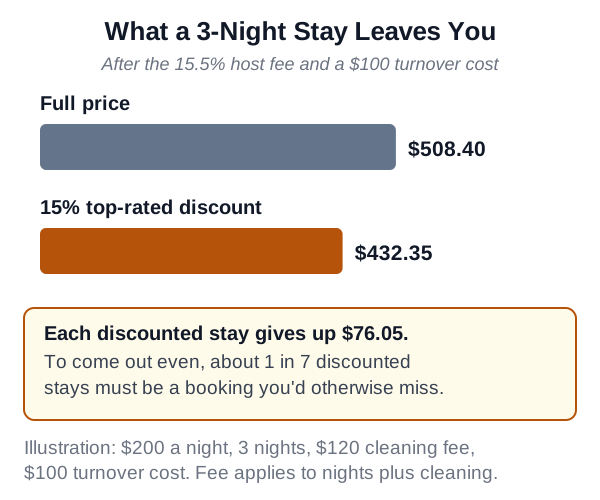
The break-even share rises with your turnover cost: 12.5% at $0, 13.6% at $50 and 16.6% at $150. As The Host Report put it during Airbnb's February pilot: "Make sure the visibility boost isn't just reducing revenue on existing demand" (The Host Report).
Check your floor too. In the earlier floor illustration, a $177.51 night leaves you $150 after the fee, but with 15% off the guest pays $150.89 and you keep $127.50. If your floor can't absorb 15%, leave the discount off.
Don't raise your price to pay for it
Airbnb's Host Discount Policy says hosts are "required to offer a true discount", meaning "a listing's discounted price is lower than its typical price for that specific date" (Airbnb Help Center). The pre-discount price "is the actual price guests would pay for your Listing on the same date, before the discount was offered", and it "must not be created or adjusted to present the appearance of a discount and it must represent a genuine selling price."
Airbnb reserves the right to "remove any discount merchandising, restrict your ability to add discounts or suspend or remove you or your Listing(s)" if you break the policy. That's Airbnb's platform rule, not legal advice. Raising your rates so the 15% comes off a padded price runs against it.
What earnings insights and the new calendar tips will suggest
Earnings insights add an AI summary to your earnings dashboard, and Airbnb's help center says it's "currently only available to hosts with 5 listings or less" (Airbnb Help Center). Airbnb says it "compares your expected earnings to similar listings nearby" and suggests actions "like turning on Instant Book or adding missing amenities" (Airbnb Resource Center).
The calendar tips start rolling out in October, with examples such as "adjusting last-minute settings to fill unbooked nights" and "adding a monthly discount and reducing the 3-night minimum" (Airbnb Resource Center). Airbnb's seasonal pricing guide describes the last-minute settings: shorter minimum stays for unbooked nights within 2 weeks of check-in, and discounts that step up for bookings 8 to 14, 2 to 7 and 0 to 1 days out (Airbnb Resource Center).
Treat each suggestion as something to test. Check a discount or shorter minimum against your floor and turnover cost first, using this guide to minimum stays and gap nights. If the dashboard says you trail similar listings, compare with 2026 US occupancy and rate benchmarks before you cut your price.
Only add amenities that are really in the unit. Airbnb's newsroom says guests can now "type keywords within filters", and "'baby' will surface related filters such as cribs, playgrounds or children's books and toys" (Airbnb Newsroom). A crib you ticked but don't have draws exactly the wrong guest.
Who gets the multi-listing calendar, and what does it automate?
The multi-listing calendar becomes the default desktop calendar for hosts with 6 or more listings "in the coming months" (Airbnb Resource Center). It shows open nights and reservations at a glance and lets you update prices and availability across listings at once, or in groups "like similar locations or property types."
The automation needs your rules first. Airbnb says the calendar can "Automatically adjust your minimum length of stay to unblock nights between bookings or offer last-minute discounts as unbooked nights approach." A short gap still costs a full turnover, so set the shortest stay worth a clean and the deepest discount your floor allows first.
It works on your Airbnb listings. Nothing in Airbnb's announcement or newsroom post says it connects to Vrbo, Booking.com or a direct-booking site, so don't count on it to replace a channel manager. If you list elsewhere, see how a channel manager compares with manual calendar sync.
Should you scan a 3D floor plan?
Scan one if your layout sells the place or guests keep asking how the rooms connect. Airbnb says the floor plan "gives guests a better feel for the space", and the tool builds the layout and detects basic amenities for you (Airbnb Resource Center).
Check your device first. The announcement lists "Apple iPhone 12 Pro or later and iPads with a LiDAR camera" (Airbnb Resource Center), but Airbnb's help center is narrower: "an iPhone Pro (12 or later), or an iPad Pro (2020 or later)" (Airbnb Help Center). Go by the help center.
To scan, open Floor plan in the Listing editor, tap Get started, allow camera access and capture every room. Processing takes 24 to 48 hours, and "Once it's ready, you can edit it on your mobile device or laptop before guests see it."
The scan can capture camera images, room dimensions, doors, windows and furniture, and the data goes to Airbnb "to generate the floor plan and improve the feature." Airbnb says "You're responsible for keeping sensitive or personal information out of the scan." Put away mail and personal papers first, and as Airbnb advises, open all shower curtains so showers are captured accurately.
Smart Setup builds a listing from your address
Smart Setup creates a new listing from your home's address. Airbnb says you'll have "the option to use property details about your home" and that "you can make changes before publishing your listing" (Airbnb Resource Center). It's rolling out now for hosts with eligible homes in the US, and early next year outside the US. The announcement doesn't say what makes a home eligible.
Check every detail Smart Setup fills in before you publish, because guests book on what your listing says. For what comes after launch, see this guide to your first ninety days as a new host.
What should you do this week?
Start with the row that matches your setup. If several match, do the pricing rows first, since they affect every booking.
- Price by hand or rarely change rates. Do this first: Work out your floor, then try dynamic pricing when it reaches you.
- Use a third-party pricing tool. Do this first: Keep Smart Pricing off and run one pricing engine per listing.
- Are weighing the 15% discount. Do this first: Run the break-even with your own costs and check your floor.
- Run 6 or more listings. Do this first: Set gap-night and last-minute limits before the new calendar arrives.
- Also list on Vrbo or Booking.com. Do this first: Keep your channel manager or calendar sync in place.
- Have an iPhone Pro (12 or later) or iPad Pro (2020 or later). Do this first: Clear personal items and open the shower curtains, then scan.
- Are listing a US home for the first time. Do this first: Check every field Smart Setup fills in.
Your next step
Start with your floor this week. Work out the lowest nightly price that covers your costs after the 15.5% fee, and set it as the bottom of whichever engine prices each listing: Smart Pricing, Airbnb's dynamic pricing or a third-party tool, but only one. Then run the top-rated discount math with your own cleaning fee and turnover cost before you offer 15%, and after a month keep it only if it brought in enough bookings you wouldn't otherwise have had to cover what it gave away. The other tools can wait until they reach your account.
Common questions
Does Airbnb's new dynamic pricing replace Smart Pricing?
Airbnb hasn't said. Its fall announcement and newsroom post don't explain how dynamic pricing relates to Smart Pricing, and Airbnb's Smart Pricing help page doesn't mention the new tool. Until Airbnb explains, run one pricing engine per listing. PriceLabs and Wheelhouse both tell hosts who use their tools to turn Smart Pricing off.
Does the top-rated guests discount stack with my other discounts?
Yes, with one of them. Airbnb's help center says only one new listing, custom, length-of-stay, early-bird or last-minute discount applies per reservation, and any of those may be combined with the top-rated guests discount. Airbnb doesn't say whether the percentages add or multiply, so 15% last-minute plus 15% top-rated could mean 27.75% or 30% off.
Can I raise my price to cover the 15% discount?
No, not under Airbnb's rules. Airbnb's Host Discount Policy says the price before a discount must be the actual price guests would pay on that date and a genuine selling price, not one created or adjusted to look like a discount. Airbnb reserves the right to remove discount merchandising, restrict your discounts, or suspend or remove listings that break the policy.
Which phones and iPads can scan a 3D floor plan?
Airbnb's help center says you need an iPhone Pro (12 or later) or an iPad Pro (2020 or later), because the scan uses the device's camera and LiDAR sensor. Airbnb's announcement mentions iPads with a LiDAR camera more broadly, so go by the help center's list.
Does the multi-listing calendar manage Vrbo or Booking.com?
Airbnb's announcement and newsroom post don't mention Vrbo, Booking.com or other sites. If you also list there, don't count on it to replace a channel manager or calendar sync.
Sources
Read next
Tools & Software
Channel manager vs. iCal sync: when the switch pays off
Cina ·
Pricing & Revenue
Minimum stay settings: when to hold firm and when to bend
Cina ·
Pricing & Revenue
Dynamic pricing tools and the market average: when to override them
Cina ·


